TL;DR Demonstration of bridging Avid S3L AVB and Waves SoundGrid using the Waves SoundGrid BR1.
In the video I demonstrate a fifth way of using Waves plug-ins with the Avid S3L. (See my previous vlog for the first four ways.) This solution is quite simple and powerful. I also evaluate the configuration based on complexity, portability, latency, and cost.
The five methods are:
Hardware Inserts
Analog Fx Returns
AVB Fx Returns
SoundGrid Fx Returns (MOTU M64 + DiGiGrid MGO)
SoundGrid Fx Returns (Waves SoundGrid BR1)
Please watch the video, and let me know in the video comments what you think, and what other kinds of videos you’d like to see.
P.S. You’re welcome to read the script I used in planning the video.
TL;DR I’ve you’ve ever wanted to use Waves plug-ins with the Avid S3L, then I’ve got the video for you.
In the video I demonstrate four different ways of using Waves plug-ins with the Avid S3L. While running plug-ins directly on the console is not supported, these alternatives should be attractive alternatives to most sound engineers. I evaluate each configuration based on complexity, portability, latency, and cost.
The four methods are:
Hardware Inserts
Analog Fx Returns
AVB Fx Returns
SoundGrid Fx Returns
Please watch the video, and let me know in the video comments what you think, and what other kinds of videos you’d like to see.
P.S. You’re welcome to read the script I used in planning the video.
TL;DR I’ve you’ve ever wanted to connect a MOTU AVB device to your Avid S3L, then I’ve got the video for you.
In the video I demonstrate connecting a MOTU Stage-B16 to expand both the input and output signal count, as well as how to record from the MOTU in addition to other stage boxes.
The process requires changing an internal configuration of the Avid S3L, but this is a simple one-time process that is reversible if needed. Once the change is made, it should be possible to connect practically any AVB device to the S3L. The process required some trial and error, and some help from the Avid forums, but it works consistently and I’ve used it for a while now.
Please watch the video, and let me know in the video comments what you think, and what other kinds of videos you’d like to see.
TL;DR I’ve you’ve ever wanted to make a redundant recording of an Avid S3L (i.e., record on two computers simultaneously), then I’ve got the video for you.
I’ve played around quite a bit with the S3L and found that it has capabilities beyond those mentioned by Avid. Specifically, the AVB protocol allows for much more, but for simplicity sake, the S3L does not expose anything other than that which is needed to meet common customer needs.
One common need that isn’t addressed though is making a redundant recording, like when one is recording a live performance and wants to insure against a computer crashing or something. As this requires extra hardware, it isn’t something supported “by default”, but with the purchase of an AVB Switch (e.g., the PreSonus SW5E, or the Netgear GS724Tv4 with additional AVB license), this becomes easily possible.
Please watch the video, and let me know in the comments what you think, and what other kinds of videos like this you might like to see.
TL;DR From my initial testing, macOS Big Sur works great with the S3L and S6L.
When I first started testing, I was doing so through the PreSonus SW5E, which resulted in the clicky AVB audio problems I’d experienced with macOS High Sierra (see my previous blog post on the topic.) After upgrading the firmware on the SW5E, everything worked great.
TL;DR I wanted great sound from Apple Music, and I wanted to add an EQ for better video conferencing sound. I didn’t want to change the EQ all the time. Configuring my Mac to use separate outputs of my MOTU 828mk3 was the solution.
I’m the manager of a globally distributed team, and I work with many other teams who are also globally distributed. For me, this means I practically live in video conferences – especially now as I’ve been stuck in home office for the last 9 months! Some of the VCs I connect to sound horrible due to low quality laptop microphones or reverberant rooms, which I find annoying as someone who enjoys good audio.
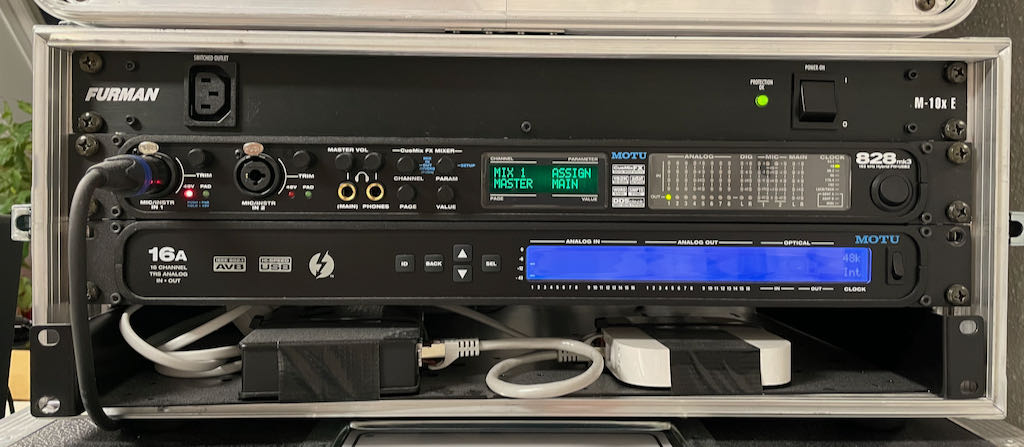
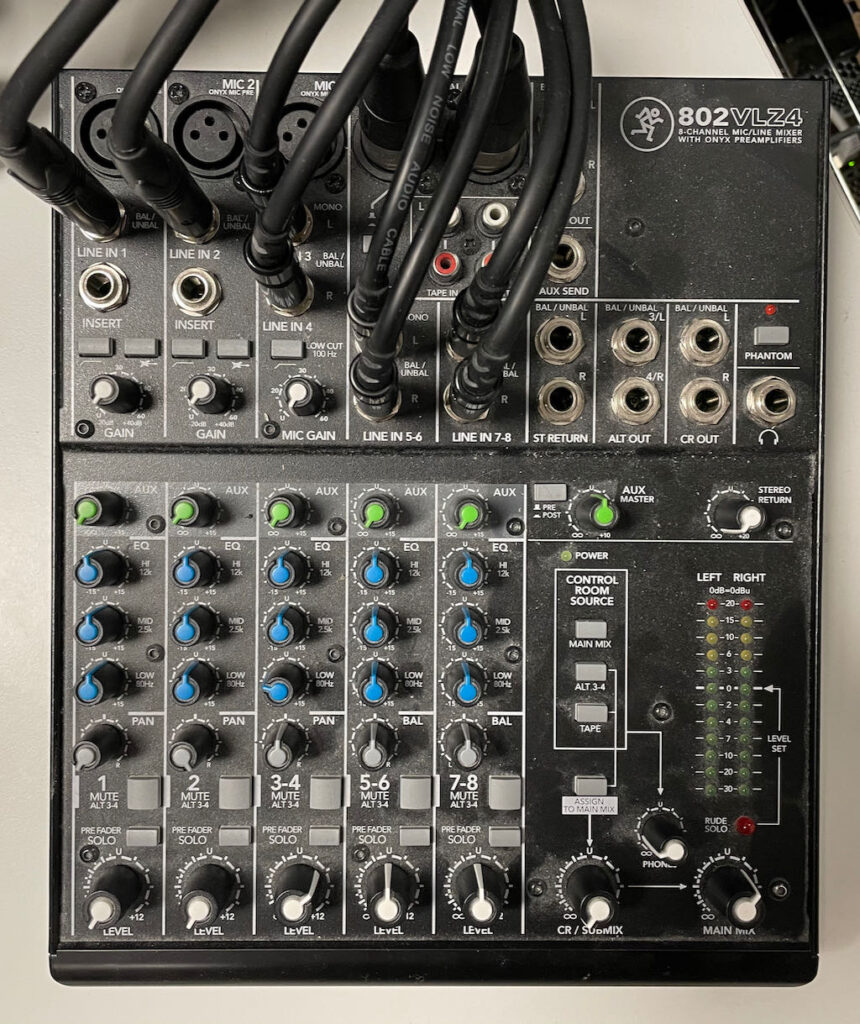
I use a MOTU 828mk3 Hybrid (connected via USB) as the primary audio interface on my work computer. The default L/R channels route out the Main Outs to a Mackie 802VLZ4, which drive my M-Audio BX5 D2 studio monitors and SBX10 sub. I also have a microphone conned to Mic 1. Despite being 9.5y+ old, the MOTU works flawless for me, even under macOS Big Sur!
My MOTU 16A (for personal) and MOTU 828mk3 Hybrid (for work) audio interfaces.
Lately, I became annoyed enough with having the EQ / de-EQ / EQ / de-EQ process as I would go back-and-forth between music and VCs that I decided to do something about it. I had a “duh” moment, and decided to route additional outputs from the MOTU to the Mackie so I could have a dedicated channel for VC.
Steps to achieve my setup
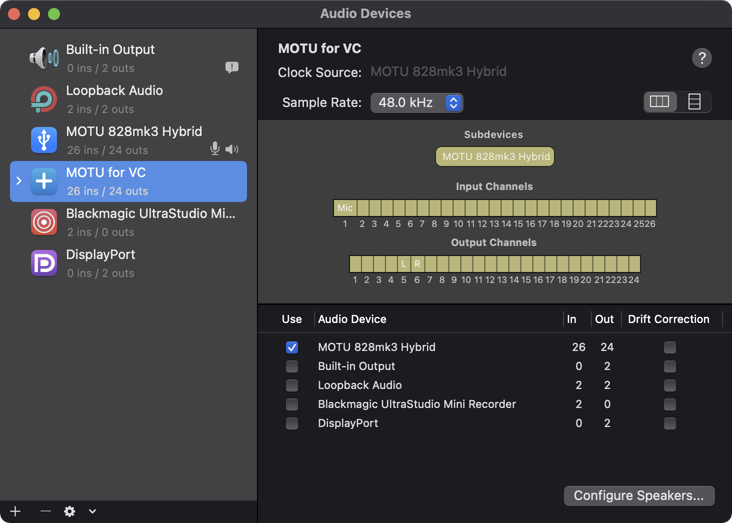
Create an aggregate audio device. macOS has the wonderful feature of Aggregate audio devices, which I normally use to combine multiple audio interfaces into a single audio device. I started by creating a “MOTU for VC” aggregate audio device using only the MOTU 828mk3 as the subdevice. As I’ll be sending the VC audio out Analog 3-4 (output channels 5-6 on this device), I named them L and R so I’d have those names for references in the future.
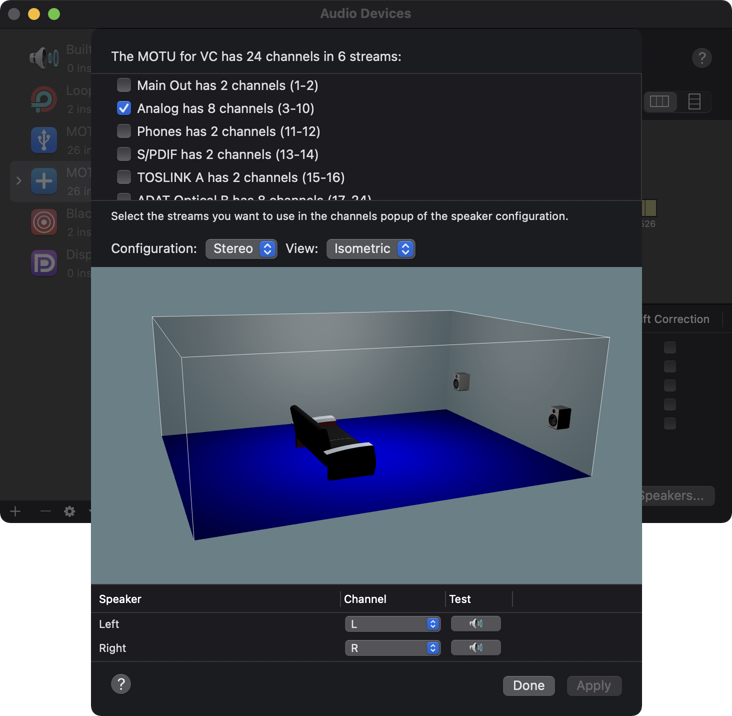
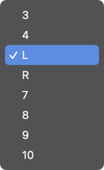
By default, the device uses channels 1-2 for signal output, which route to the Main Outs. To change that, click “Configure Speakers…” to bring up the speaker configuration window. Select the “Analog” stream which supports the desired channels 5-6, and then choose the correct channels for the Left and Right speakers at the bottom.
NOTE: As I named channels 5-6 as L and R earlier, those channel names showed up here as well.
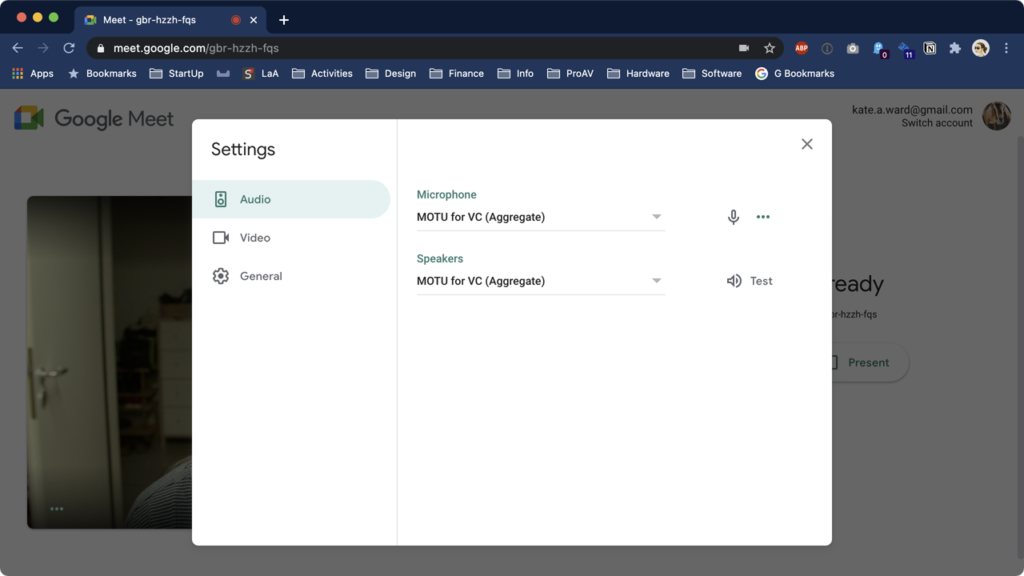
The final software step is configure Google Meet to use the “MOTU for VC (Aggregate)” device for Microphone and Speakers. This step also works for Zoom, Microsoft Teams, and Skype too.
For the hardware step, I now routed cables from Analog 3-4 to channel 3-4 on the Mackie. (Channels 5-6 are the Main Outs from the MOTU 828mk3, and 7-8 are from the MOTU 16A.)
With everything wired, I can now set custom EQ and level values on 3-4 for VC meetings, and still have a clean signal on 5-6 for music. Problem solved!
TL;DR The display resolution on macOS can also impact Lightroom performance. For best results, leave it to the “Default” resolution (especially on 4K monitors), or change it to Scaled / More Space to use the maximum resolution of the screen. Any scaled resolution between the default and max can impact performance.
[Update 2020-08-25] In my testing, Lightroom Classic 9.4 appears to fix the issues described in this post.
[Update 2020-11-10] The newest release of Lightroom Classic 10.0 seems to be even worse than 9.3, despite its many “performance improvements”. Sigh.
[Update 2021-01-17] Lightroom Classic 10.1 is back to the performance levels like 9.4, but overall I still consider it meh.
I’m an avid user of Adobe Lightroom since version 1.0, and have used it on tens of thousands of photos. I’ve tried other software in the meantime, but always came back to Lightroom.
Starting a few years ago, the newest versions of Lightroom felt slower than previous versions, a complaint that many people on the internets have had. I too have had slowness, especially on my 2013 Mac Pro, and this became especially true once I upgraded to a 4K monitor. After a recent Fstoppers article entitled Dramatically Speed up Lightroom Performance, I decided to dig into the problem.
Unfortunately in my case, I’d already tried all of the tricks in the Fstoppers article, as well as those from the linked Adobe article on how to Optimize performance of Lightroom. No matter what I tried, nothing worked. I’ve found one trick though that I’ve never seen mentioned, so I’m sharing it in hopes that it helps somebody else.
Make sure your display resolution is set at “Default for display” or “Scaled / More Space”. Anything else can cause performance problems.
On retina and 4K screens, macOS doubles the screen resolution chosen behind the scenes, and then scales it down by 50% so that text appears extremely clear. The only exception is Scaled / More Space which uses the native screen resolution.
In my case, I normally run my screen at the non-default resolution of 3008 x 1692, which means Lightroom is rendering to an actual display resolution of 6016 x 3384. If I change back to the Default or Scaled / More Space resolution, the actual resolution drops to 3840 x 2160, which is 64% smaller. That difference enables Lightroom to render the UI elements much faster, probably because my graphics cards can handle that better.
macOS Spaces are a productivity tool that allows users to have multiple virtual desktops that allow for focused work per screen. Anyone who has used Spaces has probably noticed the swoosh animation when changing between spaces. I use Spaces a lot in my daily work, and I find the default swoosh animation quite distracting whenever I change Spaces.
I put together a short video that reduces the distraction of the swoosh automation by enabling “Reduced motion” in the Accessibility settings.
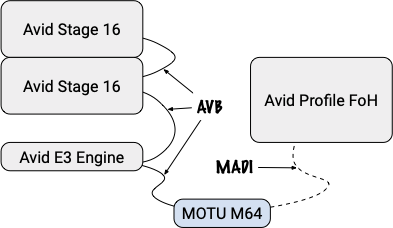
TL;DR The MOTU M64 works great with the Avid VENUE S3L. The tested setup was sending 32ch of audio from an Avid VENUE S3L via AVB to a MOTU M64, converting the signal to optical MADI, and sending it over fiber into an Avid VENUE Profile.
Background
A couple of weeks ago, I had the privilege of working with Patrick Müller and Luca Bruegger of Tonkultur.ch GmbH / Remote Recording Services to connect their Avid S3L system to their Avid Profile system via optical MADI using the the MOTU M64 as a converter.
Patrick and Luca were looking to use a spare Avid S3L console as additional inputs for an Avid Venue Profile console. They normally get a MADI feed from the FoH for their recording, but sometimes have the need for their own on-stage preamps. They wanted the ability to place two Avid Stage 16 stage boxes on the stage, acting as as mic preamps, and send the signals into their existing setup via optical MADI. Unfortunately the S3L doesn’t support MADI.
In their search for a solution, they were pointed at my Avid S3L and 3rd-party AVB Devices article. Seeing that I’ve connected MOTU devices already, they purchased the MOTU M64, and reached out for some help getting it going. Luckily Luca and I have known each other for several years now which made it easy to connect.
Getting it going
Working through the documentation I’ve written, we were able to get the setup working in a couple of hours. This was my first chance to test the documentation on a second S3L system, and I was able to fix some minor mistakes along the way, which should make future configurations go much faster.
A future desire they have is to leave the E3 Engine out of the mix completely, using only the Stage 16 and M64 devices. I’ve started digging into the Stage 16 to see whether that might be possible, and both Luca and I are reading more into the AVB standard, as well as Milan, which is the follow-up standard to AVB. Stay tuned!
[Update 2020-01-14] I’m now able to announce the Stage 16 via AVB so that I can record directly from it with macOS, and I can also manually control the signal settings (gain, pad, and phantom) as well as the LEDs on the front. See what all I have working on my Projects page.
TL;DR Avid Link starts at boot, and there is no setting in the app to prevent launching at boot. I hate software that doesn’t allow me to control whether it starts automatically!
To stop Avid Link from launching on macOS at boot, run the following command from a Terminal. It is a long line, so make sure to copy the whole thing. You will be asked for your password.
To again allow Avid Link to start at boot, run the same command again, changing the “false” to “true”.
Background
I’m not a fan of software makers taking action on my computers without my awareness. One of the most annoying things companies do is that they install something that starts at every boot – without asking – because they mistakenly believe that their software always needs to be running, and that I as a user am not smart enough to make that decision on my own. Even worse than not asking is not even giving the permission to stop the software from starting at boot.
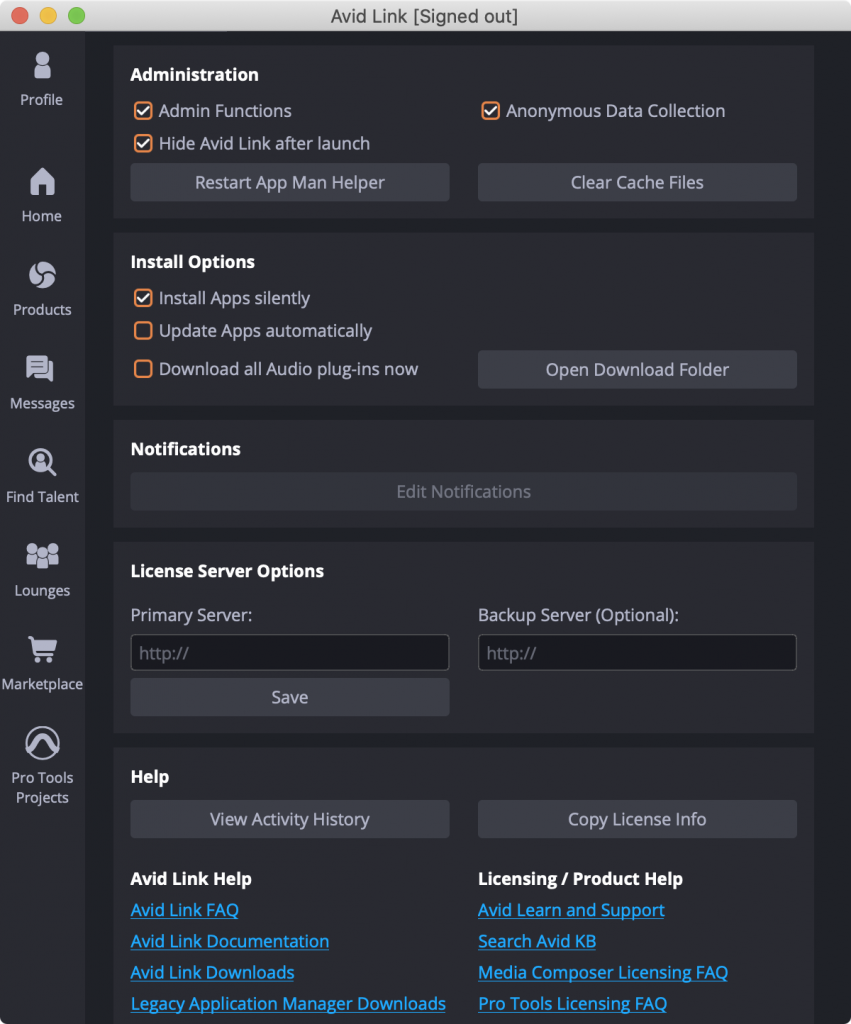
As you can see, Avid Link gives me no option to disable the launch at boot, only that it is hidden after launch.
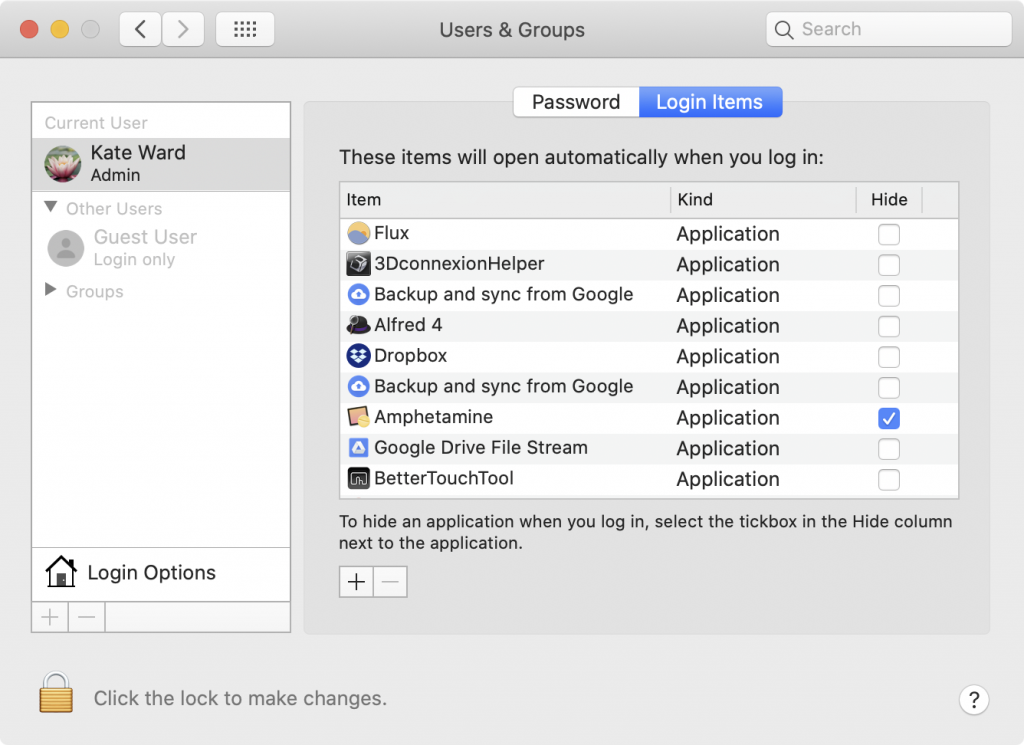
Looking in the standard location for controlling such things (System Preferences > Users & Groups > Login Items), Avid Link isn’t listed.
As you can see, I’m not against things starting at boot, only things that I cannot control!